
Requirement Yogi for Confluence and Requirement Yogi for Jira both support Atlassian Isolated Cloud (AIC), at the same price as in Commercial Cloud. By default, the apps process and store your app data in the shared Requirement Yogi environment, the same one Commercial Cloud customers use.
Need to isolate your app data? You can request a Dedicated Cloud which gives you a separate Requirement Yogi environment, with a dedicated database, a dedicated VPC and your own KMS encryption key (BYOK). It works with Atlassian Isolated Cloud.
How it works
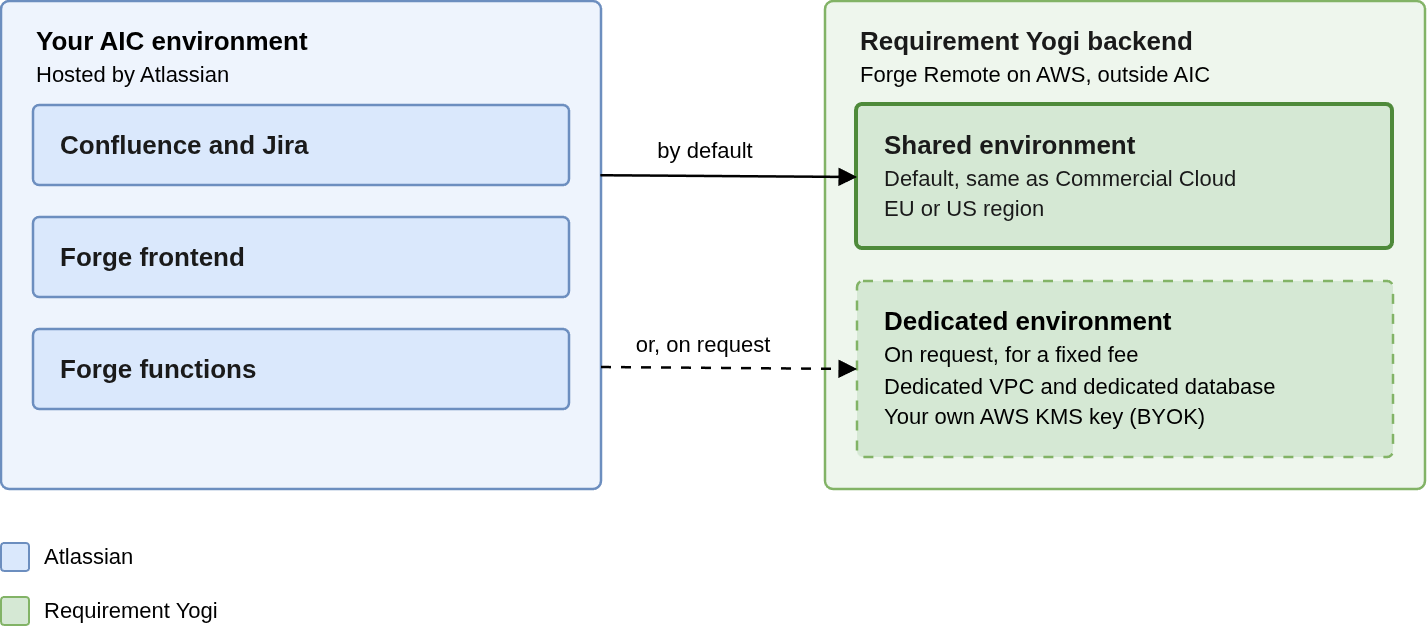
Both apps are built on Atlassian Forge. Atlassian hosts the frontend resources and backend functions inside your AIC environment, but most operations call the Requirement Yogi backend, a Forge Remote that runs on our AWS environment outside AIC.
Your pages and issues stay in AIC; the requirement data the apps extract from them is processed and stored in the backend.
Where your app data is stored
On the shared environment, your app data follows the same rules as in Commercial Cloud:
-
Region: It is stored in the EU region (Ireland) by default, or in the US region (Virginia) when your site is pinned to the US. See Data residency.
-
Encryption: It is encrypted in transit and at rest with KMS keys managed by Requirement Yogi, not with the customer-managed keys of your AIC environment.
-
Tenancy: It is stored in the same service as other customers' data, kept separate per customer.
The data itself is mostly requirement content extracted from your pages and issues. The full list is in the Security Overview.
Pricing
The apps cost the same in AIC as in Commercial Cloud: you pay their Marketplace price, with no extra fee for AIC. Dedicated Cloud is optional and adds a fixed monthly fee per dedicated environment, invoiced separately.
Install the apps
Install the Requirement Yogi apps from the in-product Marketplace of your AIC site. You can access it by navigating to Confluence/Jira > Sidebar > Apps > Explore more apps. Indeed, AIC sites don't use the public Marketplace website.
AIC blocks app egress by default. During installation, Atlassian may ask an administrator to approve the domains each app connects to. Approve the Requirement Yogi domains listed in IPs and domains: without them, the apps can't reach their backend and most features won't work.
You can review or revoke approved domains later in Atlassian Administration. Revoking them stops the apps from working. See Atlassian's page on how data egress works in AIC.
Limitations
For now, a few features aren't available in AIC:
-
Standalone app
-
REST APIs and Requirement Yogi MCP: both need a personal access token (PAT), which you generate in the standalone app, so they aren't available either.
All other features work as in Commercial Cloud. For limits that apply to every Cloud site, see Limitations.
Frequently asked questions
Q: Is my app data stored inside my AIC environment?
A: No. The frontend resources and backend functions run inside AIC, but your app data is stored in the Requirement Yogi backend on AWS: the shared environment by default, or a dedicated one with Dedicated Cloud.
Q: Can I use Dedicated Cloud without AIC?
A: Yes. Dedicated Cloud is also available for Commercial Cloud sites.
Q: Is Atlassian Government Cloud supported?
A: Not yet. Contact us if you need it.